
This guide explains how an administrator can update the lead booker linked to a booking. After the change, you can run the booking automation to send a new booking confirmation and ensure course-start and renewal reminders are sent to the updated booker.
Important: This process changes the booker on the booking only. It does not change the payer attached to the transaction. If the transaction was billed to the original booker, it will remain on that person’s file.
Note: this feature is not enabled by default and must be requested
📘 Before you begin
-
Confirm that you have administrator access.
-
Identify the booking that needs to be updated.
-
Confirm the details of the new lead booker, including their name and contact information.
-
Check whether any transaction was billed to the existing booker.
📋 Update the lead booker
-
Open the relevant booking in the administration system.
-
Locate the Lead booker or Booker field.
-
Select the option to replace the booker.
-
Search for and select the new booker. Verify that the selected person is correct before saving.
-
Save the booking.
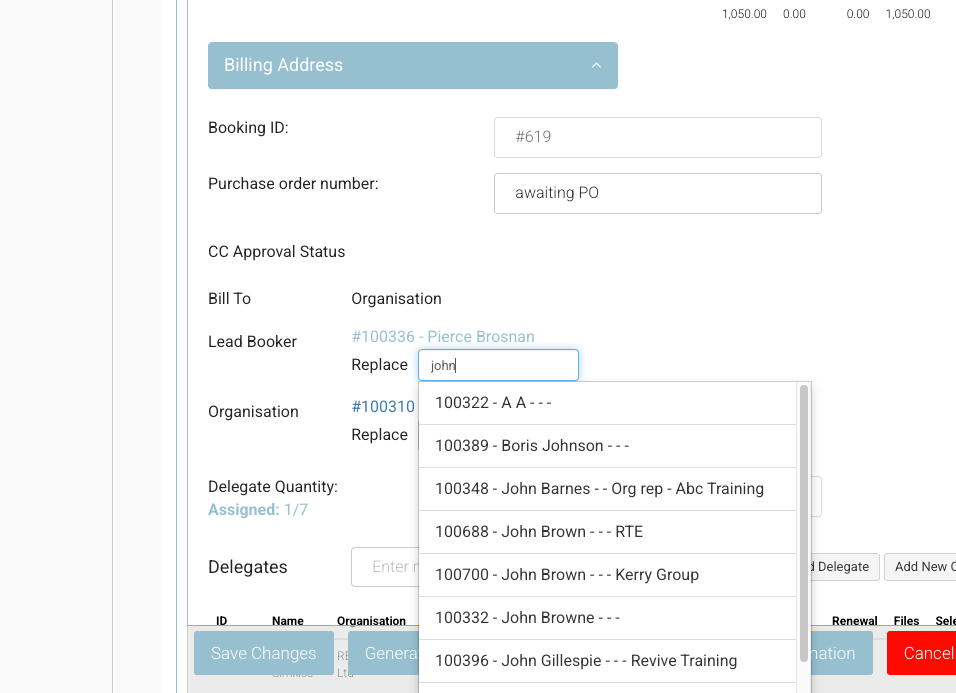
Updating the lead booker changes who is associated with the booking and who receives booking-related communications. It does not move existing payment or transaction records between customer files.
Send the updated booking confirmation
-
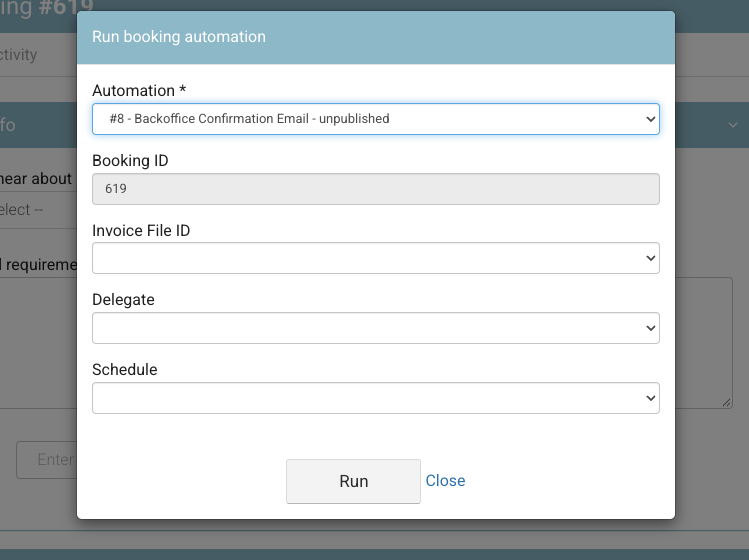
After saving the new lead booker, open the booking automation options.
-
Select Run automation.
-
Confirm that the automation is running for the updated booking.
-
Check that the new lead booker receives the booking confirmation.
Reminder behaviour
Once the lead booker has been updated, future booking-related reminders should use the new booker’s details:
-
Course-start reminders are sent to the updated lead booker.
-
Renewal reminders are sent to the updated lead booker.
Transaction reminder: If a transaction was billed to the original booker, that transaction remains on the original booker’s file. Editing the booking does not change the transaction payer.
Related guidance
Use this process when responsibility for receiving booking communications changes, while keeping existing payment and transaction ownership unchanged.