
Nominal codes help organise your sales in your accounting software. Once set up in CourseCo, this data can be easily imported into your accounting system for accurate financial tracking.
✅ Step 1: Add or Edit Nominal Codes
-
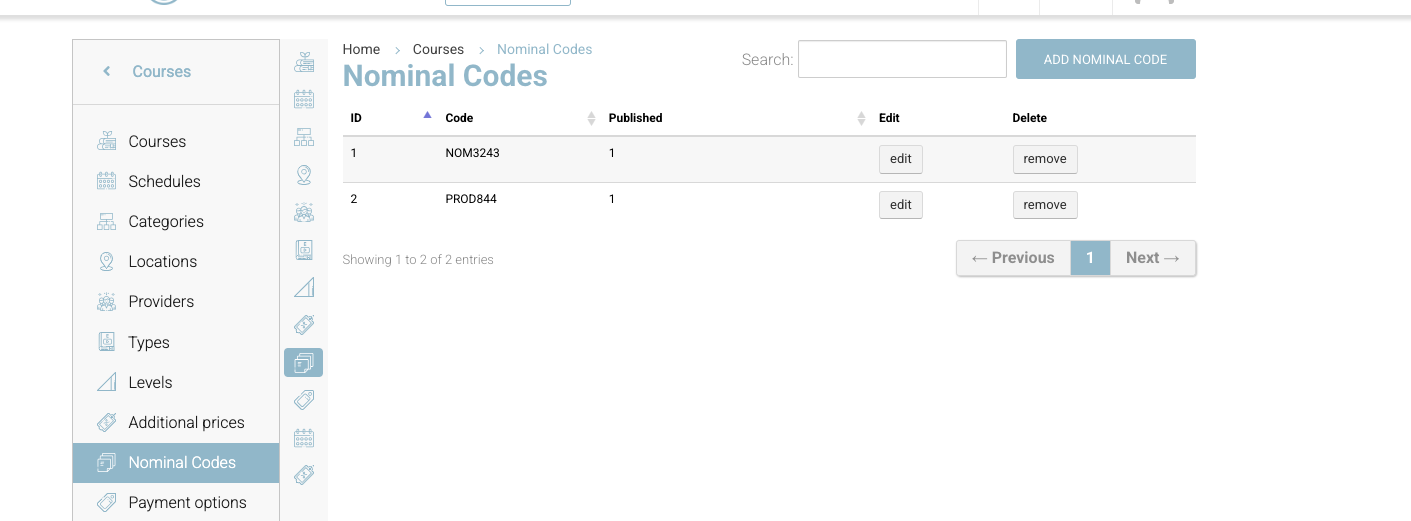
Go to Courses
From the dashboard, click on Courses in the top navigation. -
Open the Left Menu
On the left-hand side, select Nominal Code Lookup. -
Add or Edit Codes
-
To add a new code, click Add Nominal Code, enter the code and description, then click Save.
-
To edit an existing code, click the pencil icon beside it, make your changes, and save.
-
💡 Tip: Use the same codes you use in your accounting software for consistency.
✅ Step 2: Assign Nominal Codes to a Booking
-
Open the Schedule
Go to Schedule from the main navigation. -
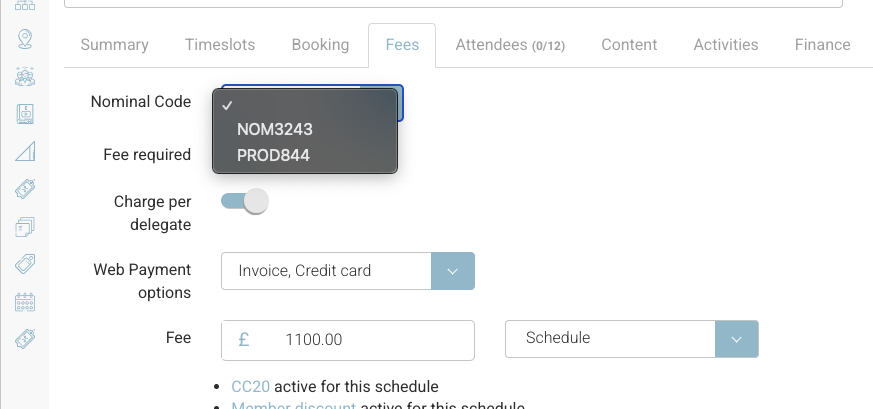
Jump to the Fees Tab
Find the course you want to edit and click into the Fees tab. -
Select a Nominal Code
In the Nominal Code dropdown, select the applicable code for this course. This ensures all related sales data is mapped correctly for accounting.
🔁 What Happens Next?
When you export your sales data, each course or booking is tagged with the relevant Nominal Code, making it easy to integrate with your accounting software.