
Overview
Our new Split Transactions feature allows admins to allocate course costs between multiple parties — typically the booker's organisation and a funding partner. For example, if a course fee is €1000, you can charge 70% (£700) to the funding organisation and 30% (£300) to the booker's company.
💡 This is an add-on feature. Please contact your CourseCo Account Manager for a demo or pricing.
✅ How to Create a Split Booking
-
Start a Back Office Booking
-
Go to Bookings > Create Booking.
-
-
Bill To: Select 'Split'
-
In the Bill To field, choose:
-
Organisation
-
Booker
-
✅ Split
-
-
-
Assign Funding Organisations
-
Use the search field to select the funding organisation(s).
-
Set the percentage split between the booker's organisation and the funding partner.
-
Example: 30% to Booker's Company, 70% to Funding Organisation.
-
Ensure you select the ADD button for each contact
-
-
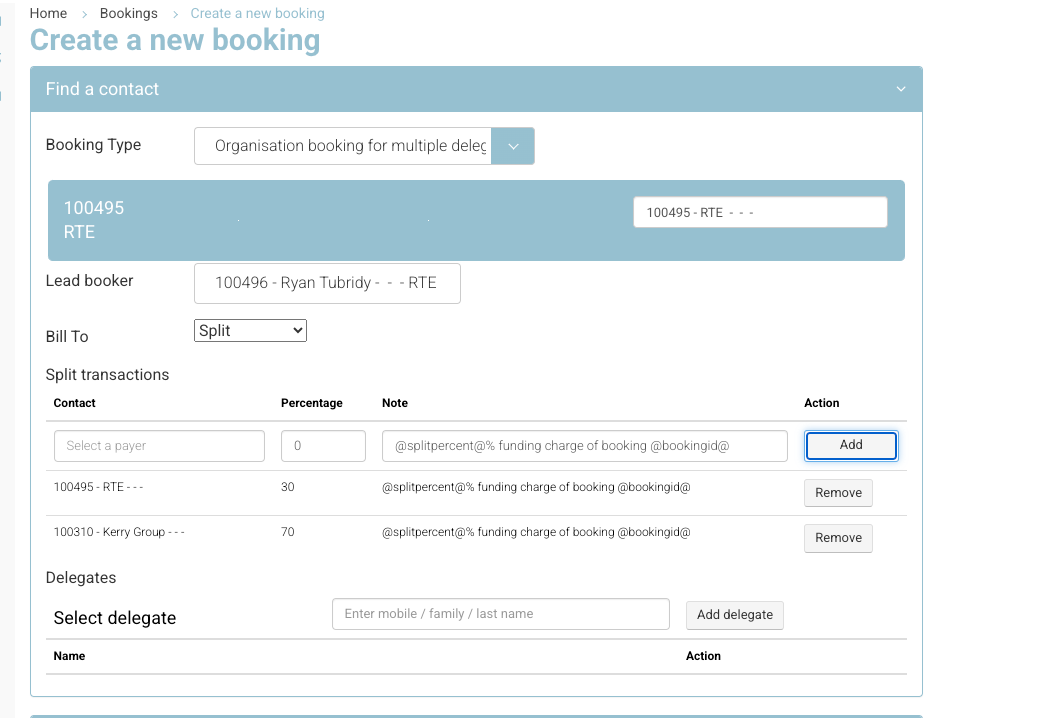
Create booking | assign funding contact
-
-
Complete the Booking as Normal
-
Add delegate names.
-
Select the course schedule.
-
Enter the PO number (if applicable).
-
Click Book.
-
🎉 Outcome
-
✅ The booking is confirmed and the delegate is added to the schedule.
-
📩 Confirmation emails are triggered as per your notification settings.
-
🔁 Two transactions are automatically created based on the selected percentage split.
-
🧾 Each transaction is linked to the relevant organisation (booker and funder).
-
💼 You can now generate invoices for each organisation as needed.
📌 Notes for Admins
-
Manual Invoice Generation: Since there are multiple invoice recipients, invoices must be generated manually.
-
Invoice Templates: The split payment invoice will pull from each organisation’s address, not the "Booking > Invoice Address" field.
-
Best Practice: Use a dedicated split-invoice template to keep formatting clear and consistent.