
Contacts can opt in to receive marketing emails when completing a form via:
-
The website footer ("Sign up to the newsletter")
-
The website checkout process
-
In some cases custom website have opt in options also
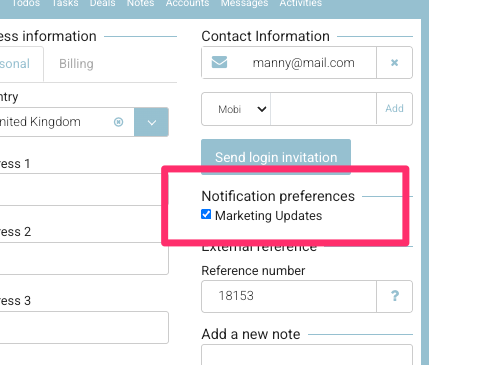
When a contact opts in, this preference is stored on their contact profile.
🔍 View or Update Marketing Preference (Admin)
-
Go to Contacts > All Contacts.
-
Select the Contact you want to review.
-
On the contact’s profile, locate the Marketing Preference checkbox.
-
✅ Ticked = Contact has opted in to receive marketing emails.
-
⛔ Unticked = Contact has not opted in.
-
-
To unsubscribe a contact, de-select the checkbox and click Save.
📊 Reporting
-
Contacts who have the Marketing Preference ticked appear in the Opt-In Mailing List report.
-
Once a contact is unsubscribed, they will no longer appear in this report.