
Purpose
This guide explains how to send a quick email to the Organisation Representatives (Bookers) linked to bookings on a specific schedule. This method ensures the message is sent to the booking contact — not the attendees.
Step 1: Open Compose Message
-
From the top menu, select the Tray icon.
-
On the left-hand side, click Compose Message.
-
Choose Compose Email.
Step 2: Refine the Recipient List
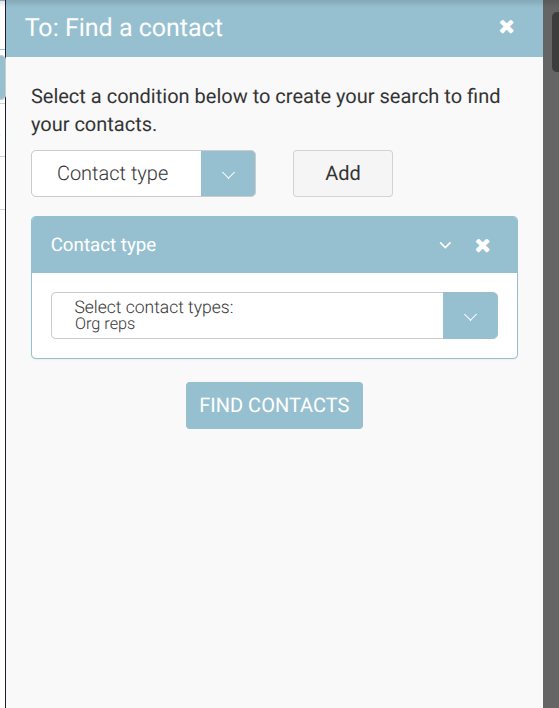
-
Click the Magnifying Glass icon to refine results.
-
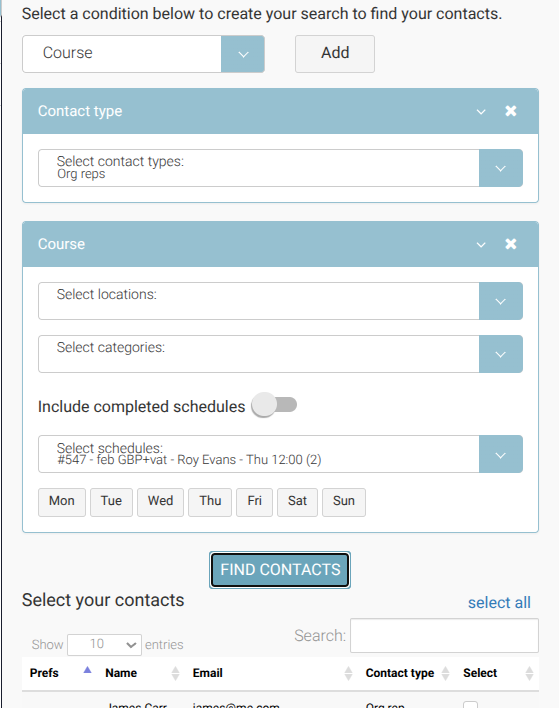
On the filter screen, apply the following filters:
• Contact Type → Select Org Rep
• Course → Select the relevant Course
• Schedule → Select the required Schedule date -
From here review your list of org reps > select all and then add
Step 3: Review the Results
After applying the filters:
-
The results will display the Organisation Representatives linked to bookings on that schedule.
-
Attendee email addresses will NOT appear.
Confirm the recipient count matches the number of booking contacts expected before proceeding.
Step 4: Compose and Send
-
Enter your Subject line.
-
Add your email content.
-
Use placeholders if required (e.g. schedule date, organisation name).
-
Click Send when ready.
Important
Always ensure Contact Type is set to Org Rep.
If Attendee is selected instead, the message will go to delegates rather than the booking contact.