
User guide: Bulk email all schedule attendees (ad hoc)
This guide explains how an admin can send a one-off bulk email to everyone on a specific schedule when you need to communicate outside of automated messages, such as urgent changes to event details.
Purpose and when to use
Use the bulk email feature when you need to quickly notify all attendees of a schedule about unexpected or important changes, for example:
-
Last-minute change to the physical location or meeting room
-
Updated start or end time for a session or the whole schedule
-
Urgent cancellations or postponements
-
Critical access details (for example, virtual meeting link or building access instructions)
Bulk ad hoc emails do not replace your normal automated reminders; they are for exceptional or time-sensitive updates that affect many attendees at once.
Prerequisites and permissions
Before you can bulk email all schedule attendees, confirm the following:
-
You have an admin-level role for the product or site, or a specific “Schedule manager” role for the relevant schedule.
-
The schedule has been created and published so that attendees are already associated with it.
-
Attendees have valid email addresses stored in their profiles or registrations.
-
You are allowed to contact attendees for operational and service-related updates under your organisation’s communication and privacy policies.
If you are unsure about your access, ask an authorised admin to review your role and permissions and, if necessary, update them or send the email on your behalf.
How to bulk email all schedule attendees
Step 1: Refine results to BCC on email.
-
Sign in as an admin
-
Go to the top menu ‘folder’ icon
-
select compose email
-
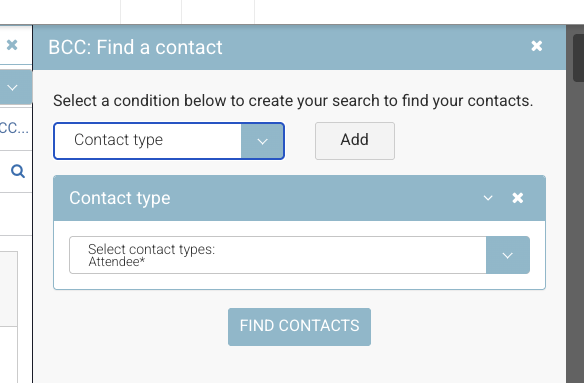
BCC + Select the magnifying glass to refine results.
-
On the search filter by
-
Contact type *Attendee
-
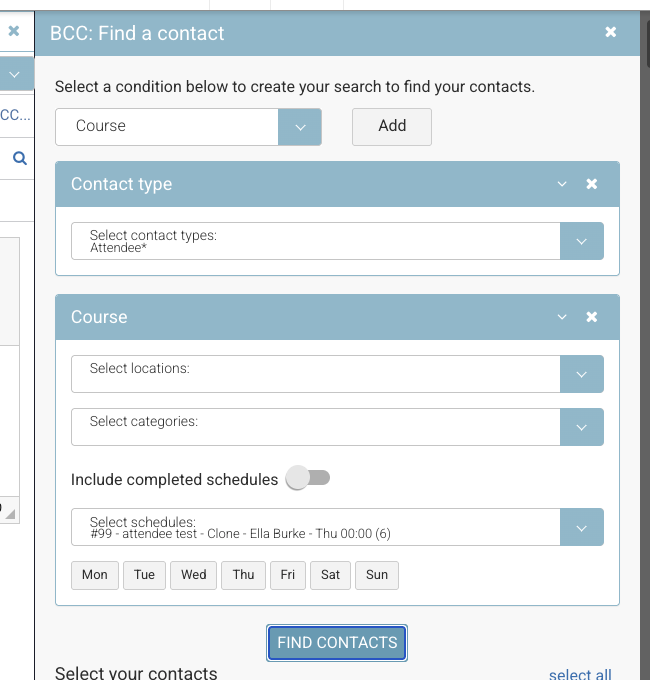
Course > and search + select the schedule
-
Find contacts
-
Select all and select all and Add to email
-
Step 2: Compose your email
1. Enter subject line and text
-
Send email
-
Review Messaging all folder to ensure your emails sent as expected.