
In some cases, you may ask your delegates to complete an online assessment while on the trainer-led training. This could be in person or online via Zoom. In both cases, the trainer can ask the delegates to login into their portal and complete a multiple-choice questionnaire while in the training.
Configure an online, trainer-led questionnaire
-
Login as Admin
-
Go to courses and select the schedule
3. Navigate to the content tab
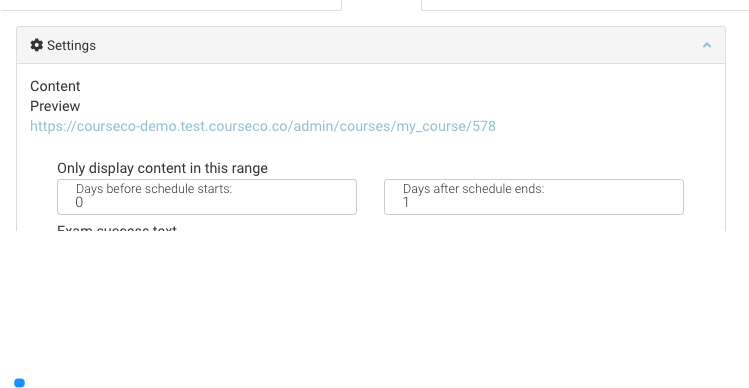
4. Within the settings section, navigate to the input Only display content in this range
-
As you want the delegates to complete the exam on the day, select 0 in Days before the schedule start input
-
Add 1 in the Days after schedule ends input
5. Add the exam
See detailed steps for embeding exam
6. Save
Outcome:
-
The schedule is saved with the questionnaire embedded
-
Students can access the exam on the day of the training only
-
Students can complete the questionnaire via mobile or desktop
-
Students will receive their results instantly
See further details on how a student completes the questionnaire