In some scenarios, an upcoming payment or outstanding payment might need to be manually paid i.e. the booker sends you the payment manually before or after the automatic payment run has happened.
How to manually mark a flexi payment installment as paid
-
Login as admin
-
Open bookings and search and select the applicable booking
-
Navigate to the accounts tab and filter by the booking id
-
Select the transaction
-
the payment section will display the transactions and due dates for each
-
-
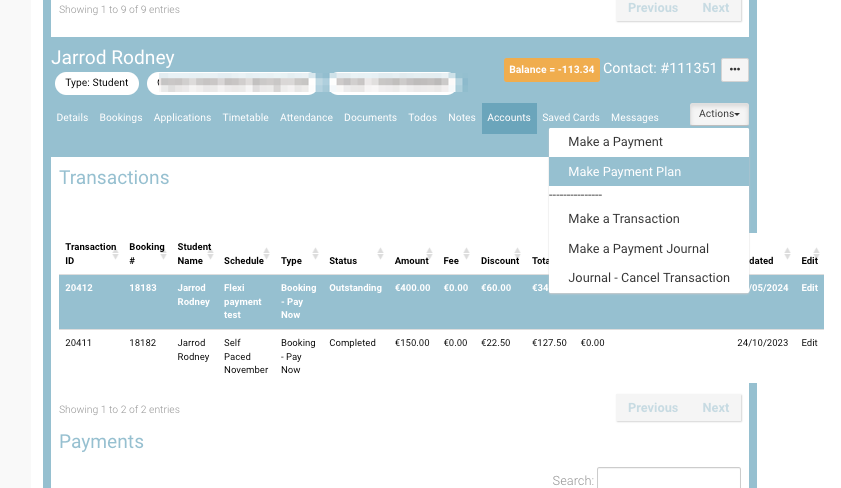
Once the transaction is selected, navigate to the top right ‘Actions’ menu
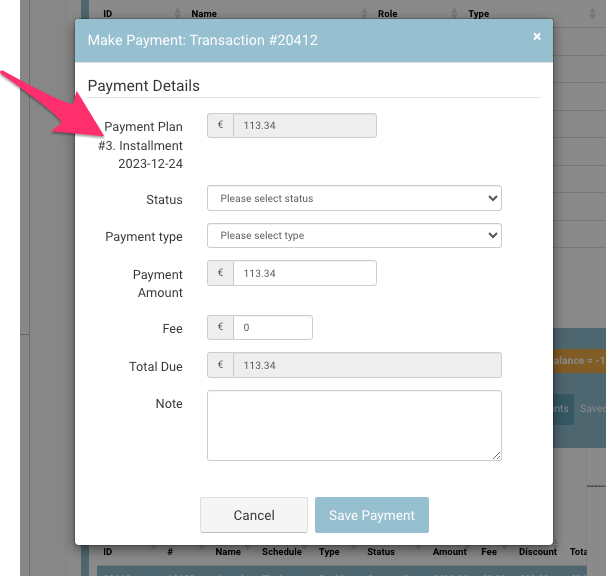
Make a payment window
-
Select Make a Payment
The popup will present the next installment by default i.e. installment #2
-
On the popup - select Status Payment and Select Payment type eg EFT, cash or card…
-
Enter in the amount being paid
-
Save
Outcome:
-
Installment will be paid IF the installment date has not been met yet, the automatic payment will not be taken as it has 0 outstanding.
IF you are prepaying more than 1 installment, complete the above action again to pay off installment #3