
Please get in touch with your CRM Lead if you wish to arrange a demo for ‘Checkout Flexi-Payment’ Feature.
To view a checkout flexi payment in backoffice bookings, follow the steps below:
-
Go to the website
-
Login as an admin
-
In the left menu, go to bookings
Please note that a flexi payment checkout booking must be created by a student on the checkout
-
Select the booking in booking list
-
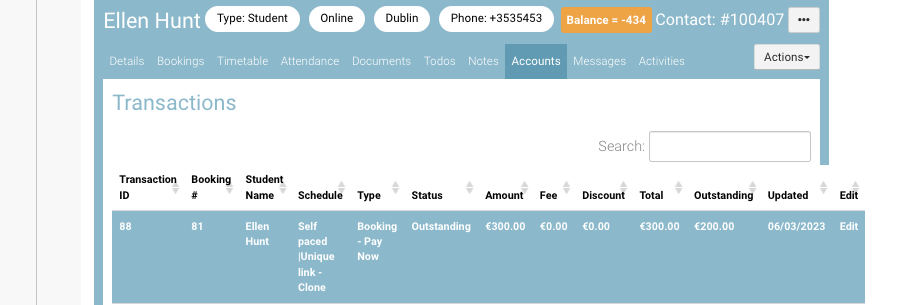
In booking details, select the ‘Accounts’ tab to see flexi-payment plan
-
Click on the transaction to view the flexi payment plan for the booking
-
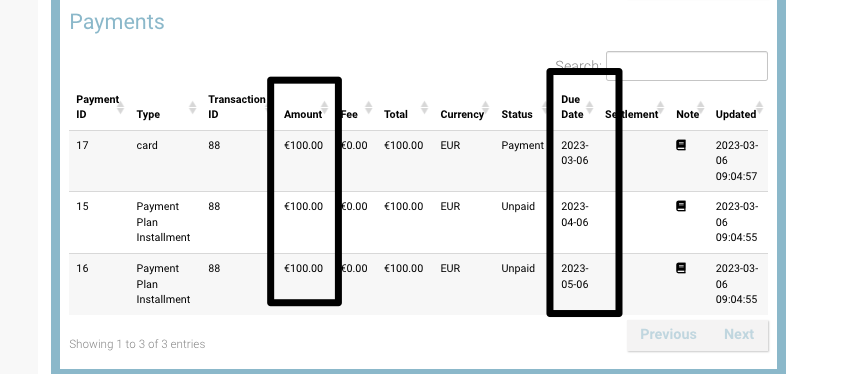
You can view the due amount and due date in the ’Payments' section
-
You can view the status of the transaction i.e paid or unpaid amount
Outcome:
-
Admin can view the booking details of a flexi-payment checkout booking
-
Admin can view due dates and due amount of a flexi-payment booking