
System logs allow you to review activity between CourseCo and external services such as Stripe or Twilio. This is typically used for troubleshooting integrations or verifying API activity.
How to Access Logs
-
Log in as an admin user
-
Click your profile icon in the top right corner
-
From the dropdown, select System
-
In the left-hand menu, select Logs
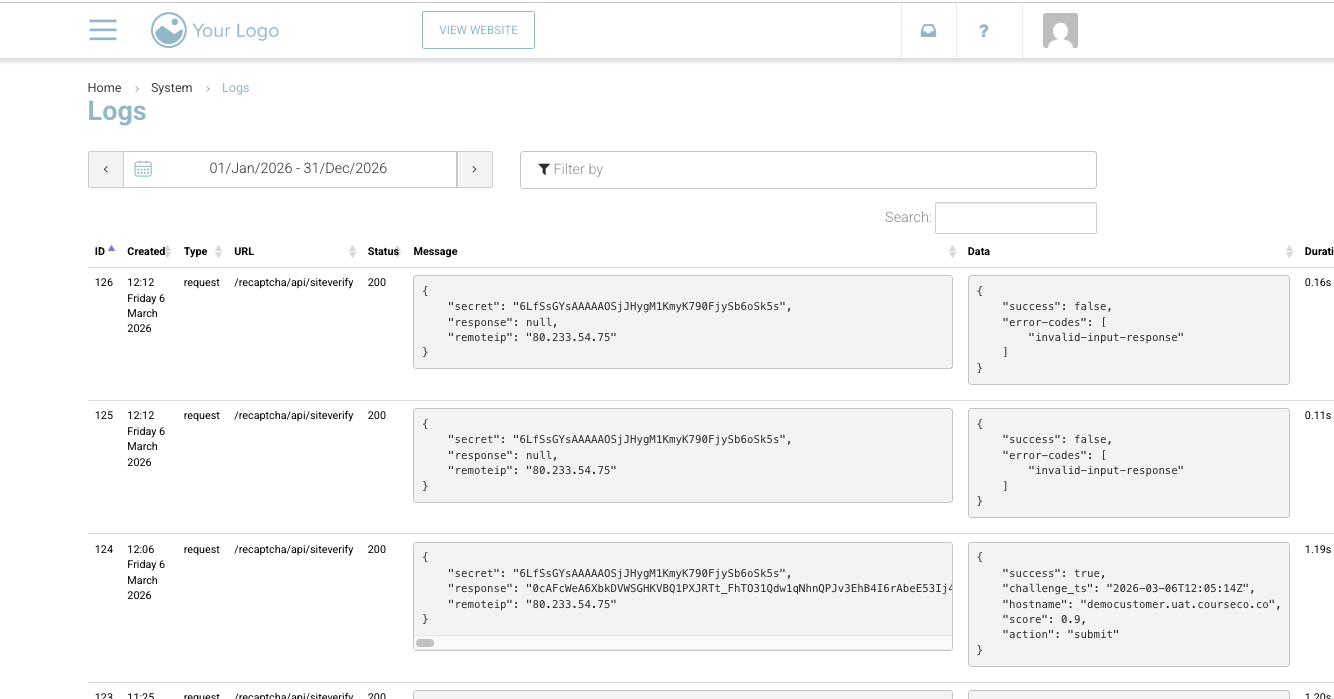
How to Use Logs
Once in the Logs screen, you can review API activity and system events.
-
Use the date range filter to narrow results to when the issue occurred
-
Use the search/filter field to find specific API calls, for example:
-
/booking -
/payment
-
-
Data column presents the response from external system. Useful when escalating to 3rd party systems.
Each log entry will show the request and response details, which can help identify where an issue may have occurred.
Important Notes
-
Logs are designed for technical troubleshooting and are most useful for experienced team members
-
They are not intended for general admin use, as the data can be complex and low-level
-
This feature is not enabled by default
-
Access is provided case-by-case, depending on your setup and whether it will be beneficial for your team